
Budget-Friendly Home Office Ergonomics: Comfort Without Breaking the Bank
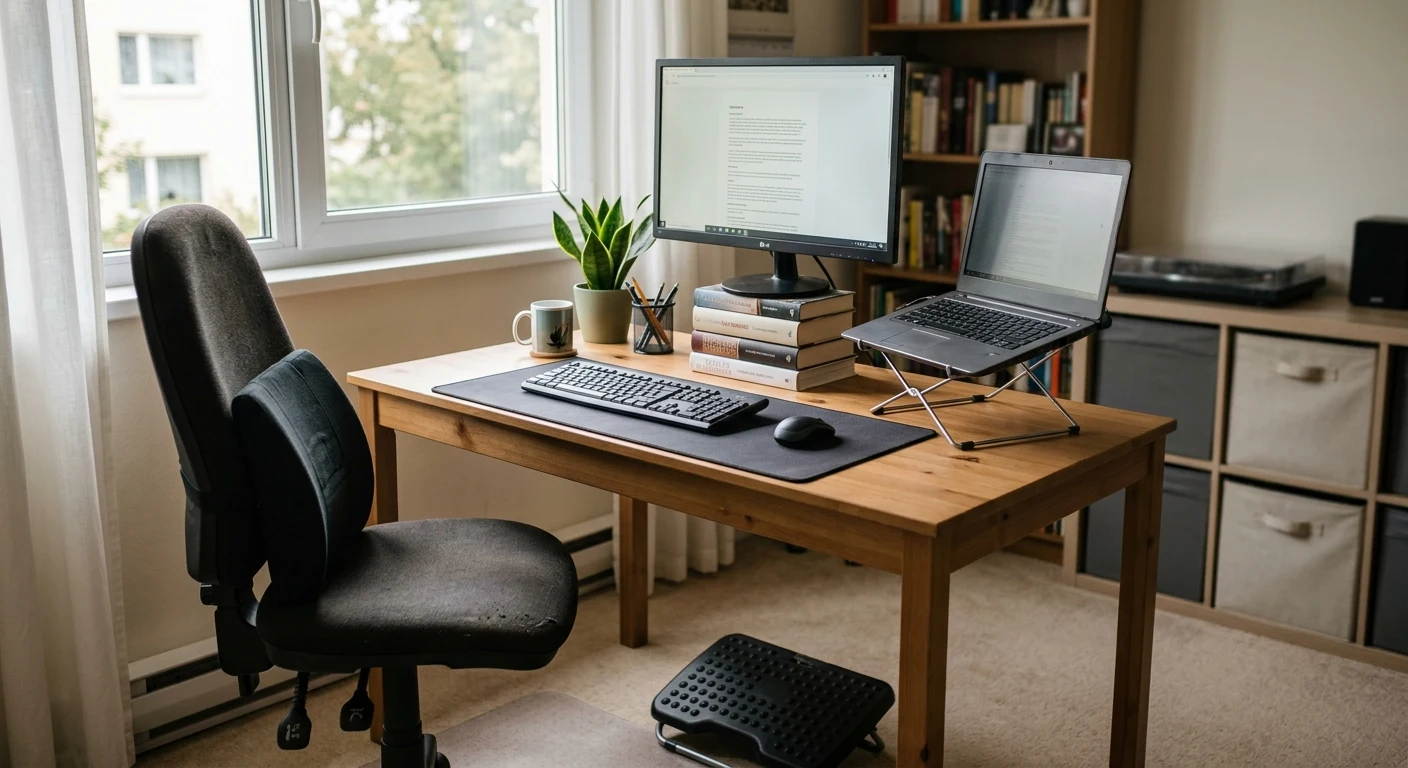
Let’s be honest—when you hear the word ergonomics, you probably picture a $1,200 mesh chair, a motorized standing desk, and a sleek curved monitor that costs more than your first car.
But here’s the truth: you don’t need a corporate budget to create an ergonomic home office.
Whether you’re a freelancer, a remote employee, or a student grinding through late-night study sessions, your body deserves better than a kitchen chair and a stack of books masquerading as a monitor stand. The good news? Small, intentional changes—many of which cost little to nothing—can dramatically improve your comfort, focus, and long-term health.
In this guide, I’ll walk you through practical, wallet-friendly ergonomic strategies that actually work. No fluff. No guilt trips. Just actionable advice you can implement today.
Why Ergonomics Matters (Even on a Budget)
Before we dive into the how, let’s talk about the why.
Poor posture isn’t just about looking slouched on Zoom calls. Over time, it can lead to:
- Chronic back and neck pain
- Repetitive strain injuries (like carpal tunnel)
- Eye strain and headaches
- Reduced productivity (discomfort is distracting)
- Fatigue and low energy
The World Health Organization lists musculoskeletal disorders among the leading causes of disability worldwide. And with remote work here to stay, your home office setup is no longer a temporary fix—it’s your daily command center.
The good news? Ergonomics is about behavior, not just equipment. You can make meaningful improvements without spending a fortune.
1. Start With What You Have: The Zero-Cost Audit
Before you buy anything, take a hard look at your current setup. You might already have the pieces of a good ergonomic workspace—they just need rearranging.
👁️ Eye Level Check
- Your monitor should be at or slightly below eye level.
- If you're looking down at a laptop screen, you're straining your neck.
Free fix: Stack sturdy books, a shoebox, or a storage bin under your laptop to raise it. If you have an external monitor, use the same trick or adjust its height.
🪑 Chair Position
- Your feet should rest flat on the floor.
- Your knees should be at or slightly below hip level.
- Your lower back should have support.
Free fix: If your chair doesn't have lumbar support, roll up a small towel or use a small pillow behind your lower back. Adjust your chair height so your thighs are parallel to the floor.
⌨️ Keyboard & Mouse Placement
- Your elbows should be at a 90° angle.
- Your wrists should be straight, not bent up or down.
Free fix: Push your keyboard back so your forearms are parallel to the floor. Use a small book or box as a makeshift wrist rest if needed.
📐 The 20-20-20 Rule
Every 20 minutes, look at something 20 feet away for 20 seconds. This reduces eye strain and encourages micro-movement.
Cost: $0
2. The $50 Ergonomic Upgrade Kit
If you have a little room in your budget—say, $50 total—here’s where to invest for maximum impact.
| Item | Approx. Cost | Why It Helps |
|---|---|---|
| Laptop stand or riser | $15–25 | Raises screen to eye level, prevents "tech neck" |
| External mouse | $10–15 | Reduces wrist strain compared to trackpad |
| Footrest | $10–20 | Supports feet, improves posture, reduces lower back pressure |
| Wrist rest (keyboard) | $8–12 | Keeps wrists straight, prevents carpal tunnel |
My Top Picks Under $20 Each:
- Laptop Stand: Nulaxy Laptop Stand (adjustable, lightweight) — ~$18
- Ergonomic Mouse: VicTsing Vertical Mouse — ~$14
- Footrest: Rainy Day Memory Foam Footrest — ~$16
- Wrist Rest: Gimars Memory Foam Wrist Rest — ~$10
Total: ~$58 for a full ergonomic upgrade. That’s less than a dinner out for two.
3. DIY Standing Desk: The $20 Hack
Standing desks can cost hundreds of dollars. But if you're curious about standing while working (and the science strongly supports it), here’s a budget-friendly alternative:
🔧 The "Desk Converter" Method
Buy a tabletop laptop stand or a monitor riser with a pull-out keyboard tray. Place it on your existing desk. When you want to stand, put the riser on top of your desk and work from there.
Alternatively, use a sturdy ironing board (yes, really) at standing height. It’s adjustable, wide enough for a laptop and mouse, and costs $0 if you already own one.
🧱 The "Stack It Up" Method
Stack storage cubes, books, or sturdy boxes to create a standing-height surface. Just make sure it’s stable—you don’t want a laptop crashing down mid-email.
⏰ Pro Tip:
Start with 15–20 minutes of standing per hour. Alternate between sitting and standing to reduce fatigue.
DIY Cost: $0–20
4. Smart Posture Habits (No Equipment Required)
Equipment is only half the story. The other half? How you use your body.
🪑 The "Sit-Bone" Check
When sitting, make sure your weight is on your "sit bones" (the two bony points at the base of your pelvis), not on your tailbone or thighs. This naturally aligns your spine.
🧘 Micro-Breaks
Set a timer every 30 minutes to:
- Stand up and stretch
- Roll your shoulders
- Do a few neck tilts
- Walk to the kitchen and back
Why it works: Movement lubricates your joints, restores blood flow, and resets your posture.
🦵 The "Chair Exercise"
While sitting, gently press your feet into the floor and engage your core. This activates your glutes and takes pressure off your lower back.
👀 Eye Relaxation
Blink often. Stare at a far-away object. Adjust your screen brightness to match the room. And consider using dark mode or a blue light filter (most devices have this built-in).
5. What to Splurge On (If You Can)
If you have a bit more to invest down the line, here’s where your money will have the biggest impact:
| Item | Why It’s Worth It | Budget Alternative |
|---|---|---|
| Ergonomic chair | Proper lumbar support, adjustable armrests, and seat depth prevent long-term damage | Second-hand office chairs (check Facebook Marketplace) |
| Monitor arm | Frees up desk space and allows perfect screen positioning | Adjustable monitor riser |
| Split keyboard | Keeps wrists in neutral position for typing-heavy jobs | Wrist rest + regular keyboard |
| USB-C dock | Allows you to plug in multiple devices with one cable | Not strictly ergonomic, but reduces desk clutter |
🛒 Where to Find Deals:
- Facebook Marketplace / Craigslist — Office liquidations sell high-end chairs for pennies on the dollar.
- Refurbished electronics — Buy open-box or renewed monitor arms and keyboards.
- End-of-year sales — Black Friday, Prime Day, and back-to-school sales often include office gear.
6. The "Ergonomics Mindset" Shift
Here’s the most important takeaway: ergonomics is a practice, not a product.
Even if you have the best chair in the world, sitting in it for 8 hours straight is unhealthy. The goal is to:
- Vary your posture (sit, stand, lean, move)
- Listen to your body (pain is a signal, not a badge of honor)
- Design your space around your body, not the other way around
Think of it like this: Your body is a high-performance vehicle. It needs maintenance, fuel, and occasional recalibration. You wouldn't skip an oil change for your car—so why skip posture resets for your spine?
7. Quick Checklist: Your Budget Ergonomic Setup
- Monitor or laptop at eye level (use riser or books)
- Feet flat on floor (use footrest or box if needed)
- Lower back supported (towel roll or small pillow)
- Elbows at 90°, wrists straight
- Screen brightness matches room light
- Timer set for micro-breaks (every 30 min)
- Alternate sitting and standing (if possible)
- Hydrate—water helps lubricate joints!
Final Thoughts
Creating an ergonomic home office doesn't have to be expensive. With a little creativity and intentionality, you can build a workspace that supports your health and productivity—without maxing out your credit card.
Start with one change today. Maybe it's raising your laptop with a stack of books. Maybe it's setting a reminder to stand up every hour. Whatever it is, your future self will thank you.
Your body is your most valuable work tool. Invest in it wisely—and affordably.
Have a budget ergonomic hack that worked for you? Drop it in the comments below—I’d love to hear it!
This article contains affiliate links. If you purchase through these links, I may earn a small commission at no extra cost to you. I only recommend products I genuinely trust.